







This comprehensive guide explains how capacitive touchscreen technology works, from basic principles to advanced implementations. Discover the science behind touch detection, the difference between surface capacitive and projected capacitive (PCAP) technologies, how multi-touch is achieved, and why capacitive touchscreens have become the standard for modern devices. Whether you're a developer, engineer, or simply curious about the technology in your smartphone or tablet, this detailed explanation will help you understand the fascinating world of capacitive touch technology.
Capacitive touchscreen technology has revolutionized human-computer interaction, becoming the dominant interface for smartphones, tablets, and modern interactive displays. Unlike older resistive touchscreens that require physical pressure, capacitive screens respond to the electrical properties of conductive objects, primarily human fingers.
Understanding how capacitive touchscreens work requires knowledge of basic electrical principles, particularly capacitance and how conductive materials interact with electric fields. This guide will break down the complex technology into understandable concepts, explaining both the fundamental physics and practical implementations.
Understanding Capacitance: The Foundation
Before diving into touchscreen technology, it's essential to understand capacitance—the fundamental principle that makes capacitive touchscreens possible. Capacitance is the ability of a system to store electrical charge. When two conductive materials are separated by an insulator (dielectric), they form a capacitor that can store electrical energy.
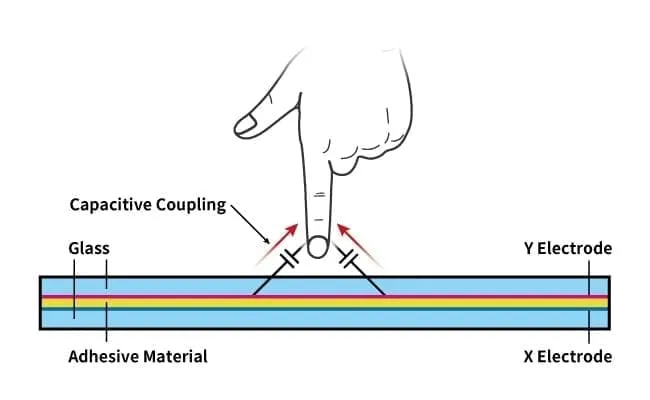
In the context of touchscreens, your finger acts as one conductor, the screen's conductive layer acts as another, and the air or protective glass layer between them acts as the dielectric. When you touch the screen, you're essentially creating a capacitor, and the touch controller measures the change in capacitance to determine the touch location.
How Capacitive Touch Detection Works
Capacitive touchscreens detect touch through changes in electrical capacitance. The screen is coated with a transparent conductive material, typically indium tin oxide (ITO), which forms a continuous conductive layer. This layer carries a small electrical charge that creates an electrostatic field across the screen surface.
When a conductive object—most commonly a human finger—approaches or touches the screen, it disrupts this electrostatic field. The human body naturally conducts electricity and has capacitance, so when your finger touches the screen, it draws some of the electrical charge, creating a measurable change in capacitance at that specific point.
The touch controller continuously monitors the capacitance across the entire screen surface. When it detects a change in capacitance at a particular location, it calculates the coordinates of the touch point and sends this information to the device's operating system, which then responds accordingly.
Types of Capacitive Touch Technology
There are two main types of capacitive touch technology, each with different implementation methods and capabilities:
Surface Capacitive Technology
Surface capacitive touchscreens use a single layer of conductive material (typically ITO) coated on a glass substrate. The conductive layer is connected to electrodes at the four corners of the screen. When you touch the screen, a small amount of current flows from each corner to the touch point, and the controller measures the current from all four corners to calculate the exact touch coordinates.
This technology is relatively simple and cost-effective, but it has limitations:
- Typically supports only single-touch input
- Less accurate than projected capacitive technology
- Requires calibration over time
- More susceptible to environmental interference
Surface capacitive technology is commonly used in larger displays such as kiosks and public information terminals where multi-touch capabilities are not essential.
Projected Capacitive (PCAP) Technology
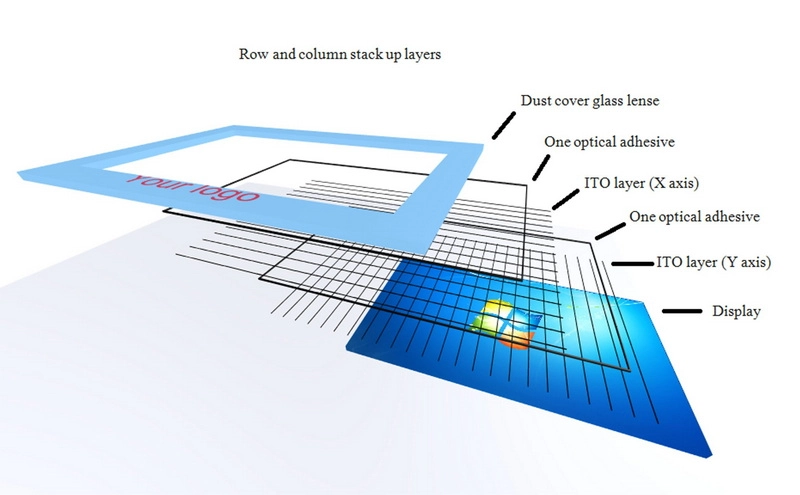
Projected capacitive technology, also known as PCAP or PCT, is the more advanced and widely used method in modern devices. Instead of a single conductive layer, PCAP uses a grid of transparent electrodes arranged in rows and columns, creating a matrix of capacitors across the screen.
There are two main PCAP implementation methods:
- Self-Capacitance: Each electrode is measured independently. When a finger touches, it increases the capacitance of nearby electrodes, allowing the controller to determine touch location.
- Mutual Capacitance: The controller measures the capacitance between intersecting row and column electrodes. A touch reduces the mutual capacitance at the intersection point, providing more precise multi-touch detection.
Mutual capacitance is the preferred method for modern devices because it enables true multi-touch functionality, allowing the system to track multiple simultaneous touch points accurately.
The Role of Indium Tin Oxide (ITO)
Indium tin oxide is the most commonly used transparent conductive material in capacitive touchscreens. ITO is a ceramic material that combines excellent electrical conductivity with high optical transparency, making it ideal for touchscreen applications.
Key properties of ITO that make it suitable for touchscreens:
- Transparency: Allows 85-90% of visible light to pass through, maintaining display clarity
- Conductivity: Provides sufficient electrical conductivity for touch detection
- Durability: Chemically stable and resistant to environmental factors
- Thin Film Application: Can be deposited as a very thin layer (typically 20-200 nanometers) without significantly affecting display quality
However, ITO has some limitations, including brittleness (which can be problematic for flexible displays) and relatively high cost. Researchers are exploring alternative materials such as silver nanowires, graphene, and conductive polymers for future applications.
Touch Controller: The Brain of the System
The touch controller is a specialized integrated circuit that manages all aspects of touch detection. It performs several critical functions:
- Signal Generation: Generates electrical signals that are applied to the touchscreen electrodes
- Capacitance Measurement: Continuously measures capacitance across the entire screen surface
- Noise Filtering: Filters out electrical noise and interference from the environment
- Touch Detection: Identifies when a valid touch occurs (distinguishing from accidental touches or environmental factors)
- Coordinate Calculation: Calculates the precise X and Y coordinates of touch points
- Multi-Touch Tracking: Tracks multiple simultaneous touch points and their movements
- Gesture Recognition: Identifies common gestures like pinch, zoom, and swipe
- Data Communication: Sends touch data to the device's main processor via protocols like I2C or SPI
Modern touch controllers operate at high frequencies (typically 100-200 kHz) to ensure fast response times and accurate touch detection. They use sophisticated algorithms to filter noise, compensate for environmental changes, and improve touch accuracy.
How Multi-Touch Works
One of the key advantages of projected capacitive technology is its ability to detect and track multiple simultaneous touch points. This multi-touch capability enables gestures like pinch-to-zoom, rotation, and multi-finger swipes that have become standard in modern user interfaces.
Multi-touch detection works by:
- Matrix Scanning: The controller scans the entire electrode matrix, measuring capacitance at each intersection point
- Touch Identification: When multiple touches occur, the controller identifies all points where capacitance has changed
- Touch Tracking: The controller tracks each touch point independently, maintaining separate identities for each finger
- Gesture Analysis: The controller analyzes the relationship between touch points to recognize gestures
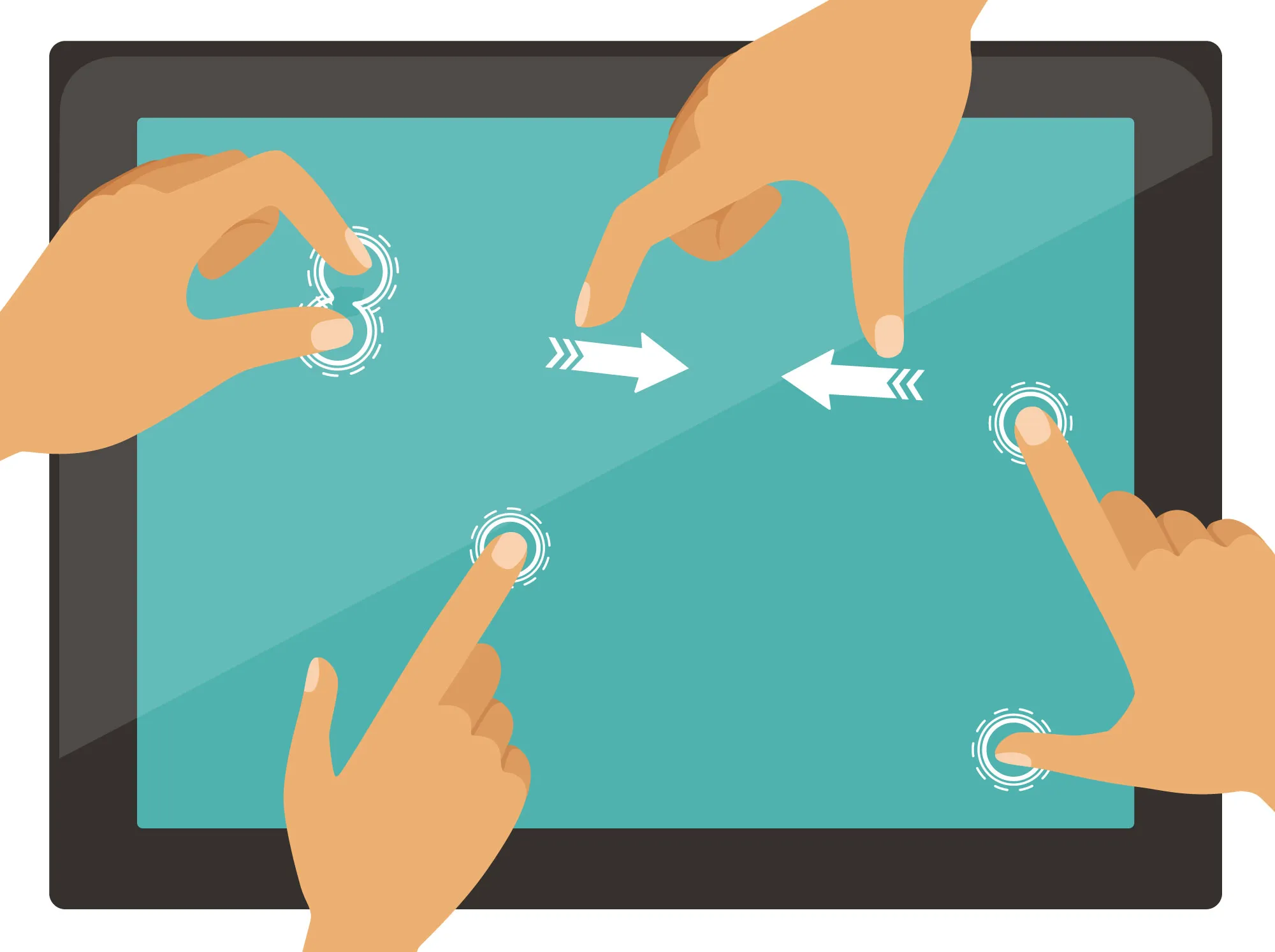
Advanced touch controllers can track 10 or more simultaneous touch points, though most consumer applications use 2-5 touch points for common gestures. The ability to distinguish between different touch points is crucial for accurate gesture recognition and prevents "ghost touches" where the system incorrectly interprets multiple touches.
Why Fingers Work (And Why Gloves Don't)
Capacitive touchscreens work with fingers because the human body is naturally conductive and has electrical capacitance. When you touch the screen, your finger acts as a conductor that draws electrical charge from the screen's electrostatic field, creating a measurable change in capacitance.
However, most gloves don't work with standard capacitive touchscreens because:
- Insulation: Glove materials (fabric, leather, rubber) are electrical insulators that prevent the electrical charge from reaching your finger
- Thickness: Even thin gloves create too much distance between your finger and the screen's conductive layer
- No Conductive Path: Without a conductive path, your finger cannot draw charge from the screen
Special capacitive gloves solve this problem by incorporating conductive materials (typically silver or copper threads) in the fingertips, creating an electrical path between your finger and the screen. Some modern touchscreens also use more sensitive controllers that can detect touches through thin insulating materials.
Touchscreen Layers and Construction
A capacitive touchscreen consists of several layers, each serving a specific purpose:
- Cover Glass: The outermost layer, typically made of strengthened glass (like Gorilla Glass) for durability and scratch resistance
- Conductive Layer: The ITO coating that forms the touch-sensitive surface
- Dielectric Layer: Insulating material that separates conductive layers in multi-layer designs
- Display Panel: The underlying LCD or OLED display that shows the visual content
- Backlight (for LCD): Provides illumination for LCD displays
In modern devices, especially smartphones, the touchscreen is often integrated with the display in what's called an "in-cell" or "on-cell" configuration, reducing thickness and improving optical clarity.
Advantages of Capacitive Technology
Capacitive touchscreens offer several significant advantages over other touch technologies:
- Multi-Touch Support: Enables advanced gestures and multi-finger interactions
- High Clarity: Transparent conductive materials maintain excellent display quality
- Durability: Glass surface is highly resistant to scratches and wear
- Fast Response: Very low latency provides immediate feedback
- No Pressure Required: Light touch is sufficient, reducing user fatigue
- Long Lifespan: No moving parts or flexible layers that can wear out
- High Accuracy: Precise touch detection with minimal calibration needed
Limitations and Challenges
Despite their advantages, capacitive touchscreens have some limitations:
- Conductive Input Required: Doesn't work with non-conductive objects like regular styluses or gloved hands
- Environmental Sensitivity: Can be affected by water, moisture, or electrical interference
- Cost: More expensive to manufacture than resistive touchscreens
- Complexity: Requires sophisticated controllers and calibration
- Size Limitations: Very large screens can be challenging and expensive to implement
Future Developments in Capacitive Technology
The capacitive touchscreen industry continues to evolve with several exciting developments:
- In-Cell Technology: Integrating touch sensors directly into display panels for thinner devices
- Force Touch: Detecting pressure levels in addition to touch location
- Hover Detection: Responding to proximity without physical contact
- Flexible Displays: Developing bendable and foldable capacitive touchscreens
- Alternative Materials: Exploring alternatives to ITO for better flexibility and lower cost
- Improved Sensitivity: Enhanced controllers that work through thicker materials
These advancements are expanding the possibilities for capacitive touch technology while addressing current limitations.
Applications of Capacitive Touchscreens
Capacitive touchscreens have become ubiquitous in modern technology:
- Smartphones and Tablets: The primary interface for mobile devices
- Laptops and 2-in-1 Devices: Touch-enabled displays for hybrid computing
- Automotive Displays: Infotainment systems and control panels
- Retail POS Systems: Modern point-of-sale terminals
- Digital Signage: Interactive displays in retail and public spaces
- Gaming Devices: Touch-enabled gaming consoles and arcade machines
- Industrial Control Panels: Modern HMI (Human Machine Interface) systems
Understanding how capacitive touchscreens work helps developers create better user interfaces, engineers design more efficient systems, and users appreciate the sophisticated technology in their everyday devices.
Capacitive touchscreen technology represents a remarkable achievement in human-computer interaction, combining principles of physics, electrical engineering, and software design to create an intuitive and responsive interface. As the technology continues to evolve, we can expect even more sophisticated and capable touch interfaces in the future.